All guides
Getting started
What is Submittal Kit Create Your Workspace Your First Project Search Everything The Dashboard Help and What's New Abbreviations We UnderstandProjects & Schedule
Project Settings Schedule and MilestonesEquipment Register
Equipment Register Basics Import a BOM Equipment DocumentsParts & Library
The Parts Library Part Documents Find Datasheets The Document Library Search Inside DocumentsSubmittals
Create a Submittal Configure Sections Choose Equipment Scope Compile a Submittal O&M Manuals Submittal Numbering Cover PagesRevisions & Review
Issue a Revision Submittal Log Returned Reviews Record an External SubmittalRFIs
RFI Basics RFI Log RFI LayoutsField & QA
Punch Lists As-Built RedlinesSpecifications & Scope
Upload SpecificationsProcurement & Change Orders
Quotes and Purchase Orders Coverage and Lead Times Change Orders Budget and SOVDirectory & Team
Firms & Contacts Team & Access Personnel & CertificationsSettings & Billing
Company Identity Library Vocabulary Billing and PlansIntegrations
Connect an AgentHelp Revisions & Review
View as MarkdownRecord an External Submittal
Put a submittal you sent outside the app on the log, with its PDF, dates, and outcome.
Some packages predate the project's move here, and some go out by hand in a hurry. Either way, a log with holes in it is a log nobody trusts. Recording puts the real PDF on the record so the history is complete.
Record it
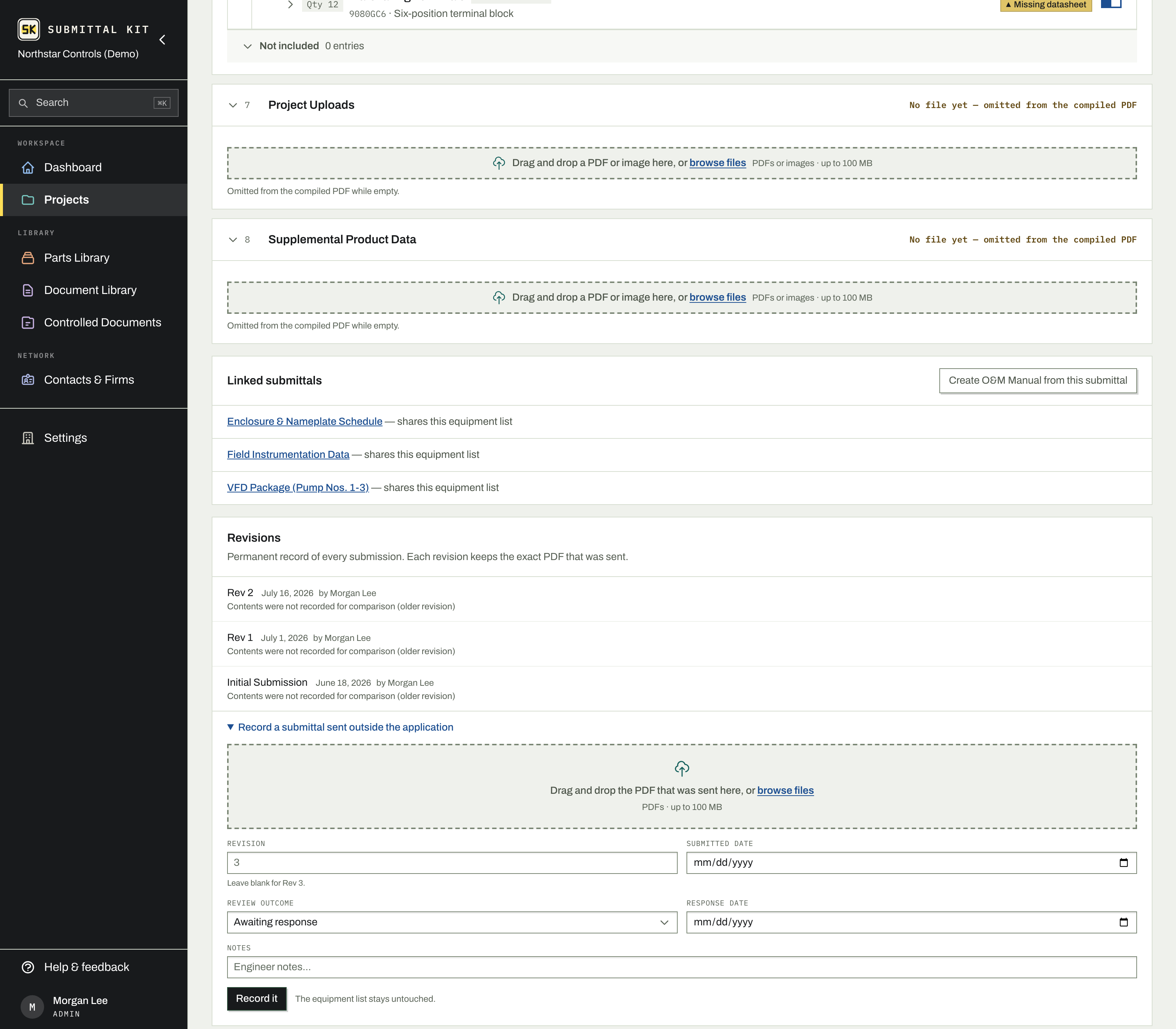
- Open the submittal and find its Revisions section. With nothing submitted yet, the recording form is right there; otherwise expand Record a submittal sent outside the application.
- Drop the PDF that was actually sent.
- Enter the revision number, or leave it blank to take the next one in sequence.
- Fill in the submitted date, and, if the review already came back, the review outcome and response date.
- Click Record it.
The revision appears on the Submittal Log like any other, marked Recorded so it reads apart from a package the app compiled. Your equipment list is untouched, and the next revision you issue from the app simply continues the numbering.
Fix a mistake
A recorded revision is typed in after the fact, so the usual error is the wrong file or the wrong date, not a bad build. Until the reviewer's returned document is attached, you can correct all of it:
- Replace the PDF from the revision's row, without re-entering anything around it.
- Change the number or the dates in the revision's drawer on the log, where the record strip saves as you go.
- Delete it entirely, even when it is not the newest revision.
Once a returned document is attached, the revision joins the permanent record like any other and corrections close. That is the point of the log: what the reviewer responded to can never quietly change underneath their response.
What a recorded revision doesn't have
Because the package was assembled elsewhere, there is no issued snapshot of individual artifacts and no recorded contents to diff against neighboring revisions; the drawer says so instead of guessing. Everything else works normally: returned documents, the outcome reading, and comment tracking treat a recorded revision exactly like a compiled one.
Bringing a project in mid-stream? Record the old revisions first, oldest to newest, then build the next round in the app. The thread reads as one continuous history.
Updated Aug 15, 2026
Can't find it? support@submittalkit.com